
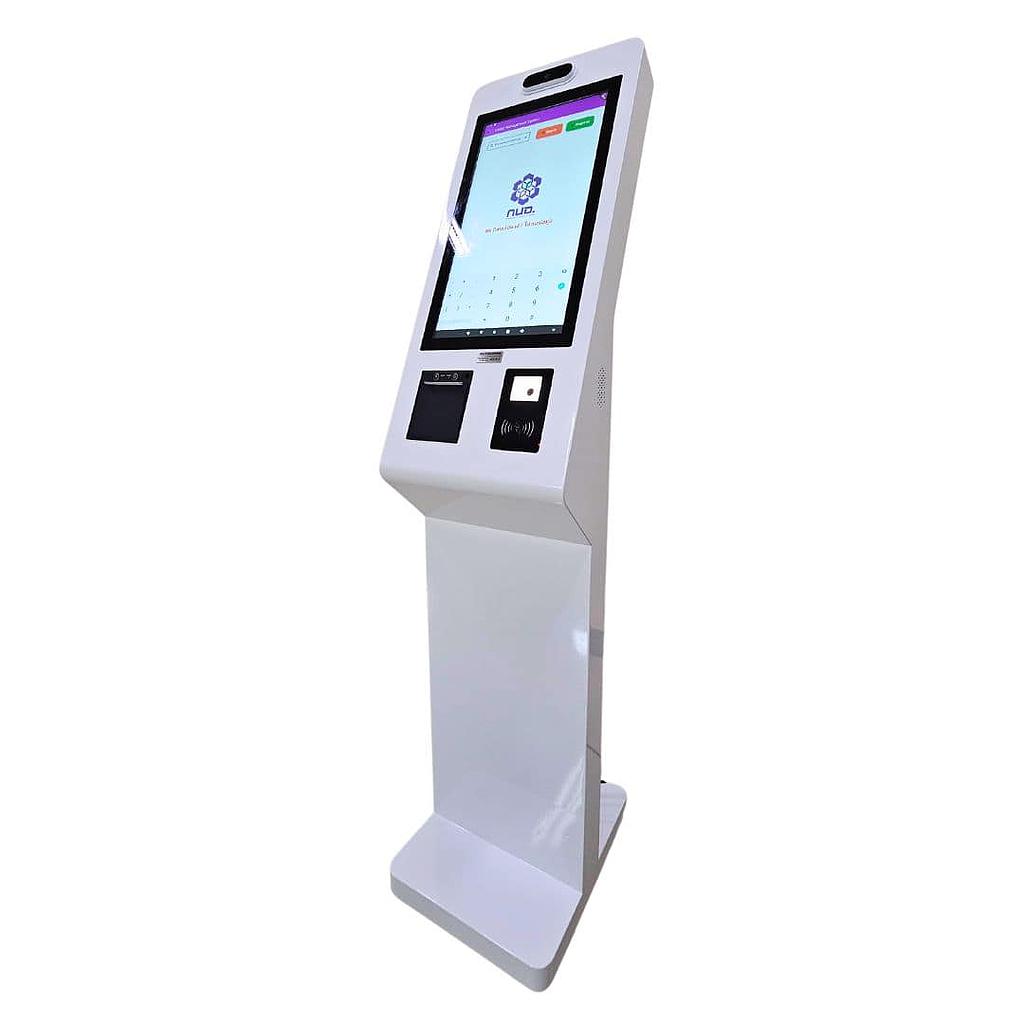


ระบบแลกบัตร เครื่องแลกบัตรบริการตัวเอง
-บันทึกผู้มาติดต่อ Visitor Managment System แบบบริการตัวเอง
-ถ่ายรูปบัตร/ บุคคล
-print ใบผ่าน
-บันทึก ค้นหา บุคคลเข้าออก มี Function AI ตรวจสอบใบหน้าจริง
-สรุปสถิติการเข้าออก
-รองรับการสั่งเปิด ไม้กั้น และ ต่อกล้อง เพิ่มมุม (Optional)
-รองรับการคิดเงินค่าจอด (Optional)
-ไม่รวมอุปกรณ์เชื่อมต่อ Internet
ระบบแลกบัตรผู้มาติดต่อ: การประยุกต์ใช้และประโยชน์ในองค์กรต่างๆ
แลกบัตรหมู่บ้าน โรงงาน อาคารสำนักงาน
ระบบแลกบัตรผู้มาติดต่อ หรือ Visitor Management System (VMS) เป็นเครื่องมือสำคัญที่ช่วยเสริมความปลอดภัยและประสิทธิภาพในการจัดการผู้มาเยือนสำหรับองค์กรทุกประเภท มาดูกันว่าระบบนี้สามารถนำไปประยุกต์ใช้ในองค์กรต่างๆ ได้อย่างไรบ้าง
การประยุกต์ใช้ในองค์กรต่างๆ:
สำนักงานองค์กร:
ควบคุมการเข้าถึงพื้นที่สำคัญ
จัดการการนัดหมายกับลูกค้าหรือพาร์ทเนอร์
ติดตามเวลาทำงานของพนักงานชั่วคราวหรือที่ปรึกษา
โรงงานอุตสาหกรรม:
ตรวจสอบความปลอดภัยของผู้เข้าเยี่ยมชมโรงงาน
บันทึกการเข้า-ออกของผู้รับเหมา
ควบคุมการเข้าถึงพื้นที่อันตราย
โรงพยาบาล:
จำกัดการเข้าถึงแผนกต่างๆ เพื่อความเป็นส่วนตัวของผู้ป่วย
ติดตามการเยี่ยมไข้ของญาติผู้ป่วย
ควบคุมการแพร่กระจายของเชื้อโรคโดยการจำกัดจำนวนผู้เข้าเยี่ยม
สถาบันการศึกษา:
ตรวจสอบผู้ปกครองที่มารับนักเรียน
ควบคุมการเข้าถึงห้องปฏิบัติการหรือพื้นที่พิเศษ
จัดการงานประชุมผู้ปกครองหรืองานสัมมนา
ศูนย์การค้าและอาคารสำนักงานให้เช่า:
บริหารจัดการที่จอดรถสำหรับผู้มาติดต่อ
ควบคุมการเข้าถึงชั้นต่างๆ ของอาคาร
จัดการระบบรักษาความปลอดภัยแบบรวมศูนย์
หน่วยงานราชการ:
ตรวจสอบและบันทึกข้อมูลผู้มาติดต่อราชการ
จัดการคิวการให้บริการประชาชน
ควบคุมการเข้าถึงเอกสารหรือพื้นที่สำคัญ
ประโยชน์ของการใช้ระบบแลกบัตรผู้มาติดต่อ:
เพิ่มความปลอดภัย: ป้องกันการเข้าถึงโดยไม่ได้รับอนุญาตและติดตามการเคลื่อนไหวของผู้มาติดต่อ
ประหยัดเวลา: ลดขั้นตอนการลงทะเบียนและการตรวจสอบตัวตน
ปรับปรุงประสบการณ์ของผู้มาติดต่อ: สร้างความประทับใจแรกด้วยระบบที่ทันสมัยและมีประสิทธิภาพ
เพิ่มประสิทธิภาพการทำงาน: ลดภาระงานของพนักงานต้อนรับและรปภ.
รวบรวมข้อมูลเชิงลึก: วิเคราะห์พฤติกรรมการเข้าเยี่ยมเพื่อปรับปรุงการให้บริการ
ปฏิบัติตามกฎระเบียบ: รองรับข้อกำหนดด้านความปลอดภัยและการคุ้มครองข้อมูลส่วนบุคคล
การเลือกระบบแลกบัตรผู้มาติดต่อที่เหมาะสม:
พิจารณาความต้องการเฉพาะขององค์กร
ตรวจสอบสามารถรองรับจำนวนผู้ใช้งานและการขยายตัวในอนาคต
ประเมินสามารถเชื่อมต่อกับระบบอื่นๆ ที่มีอยู่
ตรวจสอบฟีเจอร์ด้านความปลอดภัยและการปฏิบัติตามกฎหมาย PDPA
พิจารณาความสะดวกในการใช้งานและการบำรุงรักษา
ประเมินต้นทุนทั้งหมด รวมถึงค่าใช้จ่ายในการติดตั้งและการดูแลระยะยาว
สรุป:
ระบบแลกบัตรผู้มาติดต่อเป็นเครื่องมือที่มีประโยชน์อย่างมากสำหรับองค์กรทุกประเภทและทุกขนาด การเลือกระบบที่เหมาะสมและการนำไปประยุกต์ใช้อย่างมีประสิทธิภาพจะช่วยเสริมระบบควบคุมการเข้า-ออกของปรับปรุงประสบการณ์ของผู้มาติดต่อ และเพิ่มประสิทธิภาพการดำเนินงานขององค์กรได้อย่างมีนัยสำคัญ
ต้องการคำแนะนำเพิ่มเติมเกี่ยวกับการเลือกและติดตั้งระบบแลกบัตรผู้มาติดต่อที่เหมาะสมกับองค์กรของคุณ? ติดต่อทีมผู้เชี่ยวชาญของเราวันนี้เพื่อรับคำปรึกษาฟรี!
Visitor Management System: Applications and Benefits Across Industries
Visitor Management System: Revolutionizing Security and Efficiency Across Industries A Visitor Management System (VMS) is a crucial tool for elevating security and operational efficiency in organizations of all types. Let's explore how this innovative technology can be applied across different sectors and its numerous benefits.
Industry-Specific Applications of Visitor Management Systems:
Corporate Offices:
Control access to sensitive areas Manage client or partner appointments Track temporary staff or consultant hours
Manufacturing Plants:
Ensure safety compliance for factory visitors Log contractor entry and exit Restrict access to hazardous areas
Healthcare Facilities:
Limit access to different departments for patient privacy Monitor patient visitations Control infection spread by managing visitor numbers
Educational Institutions:
Verify authorized guardians for student pick-ups Manage access to laboratories or special facilities Organize parent-teacher meetings or seminars
Shopping Centers and Office Complexes:
Manage visitor parking efficiently Control access to different floors Centralize security management
Government Agencies:
Record and verify visitor information Manage service queues for citizens Control access to important documents or areas
Key Benefits of Implementing a Visitor Management System:
Enhanced Security: Prevent unauthorized access and track visitor movements Time Savings: Streamline registration and identity verification processes Improved Visitor Experience: Create a positive first impression with a modern, efficient system Increased Staff Productivity: Reduce workload on receptionists and security personnel Data-Driven Insights: Analyze visitation patterns to improve services Compliance: Meet security regulations and data protection requirements (e.g., GDPR, PDPA)
Choosing the Right Visitor Management System:
Assess your organization's specific needs Evaluate scalability for future growth Check compatibility with existing systems Verify security features and compliance capabilities Consider ease of use and maintenance requirements Assess total cost of ownership, including installation and long-term upkeep
Why Invest in a Visitor Management System?
Streamline Operations: Automate check-ins, reducing wait times and paperwork Enhance Professional Image: Present a modern, tech-savvy appearance to visitors Improve Emergency Management: Quickly account for all on-site visitors during emergencies Protect Sensitive Information: Control and monitor access to confidential areas Support Contact Tracing: Maintain detailed visitor logs for health and safety purposes
Conclusion:
A Visitor Management System is an invaluable asset for organizations of all sizes and industries. By selecting the right system and implementing it effectively, you can significantly enhance security, improve visitor experiences, and boost operational efficiency.
Keywords: Visitor Management System, VMS, security, efficiency, visitor check-in, access control, compliance, visitor experience, data protection, automated registration, contact tracing, emergency management.
📊 เปรียบเทียบรุ่นในซีรีส์ SW-VMS (Visitor Management System)
เปรียบเทียบระบบ/เครื่อง Visitor Management ทั้ง 8 รุ่น — เลือกตามรูปแบบใช้งาน
| รุ่น | รูปแบบ | ฟีเจอร์ | เหมาะสำหรับ |
|---|---|---|---|
| SW-VMS02 | Software | ระบบ Software อย่างเดียว | บริษัทที่มี Hardware อยู่แล้ว |
| SW-VMS03 | Handheld | รปภ. พกเดิน บันทึกผู้มาติดต่อ | Patrol รปภ. พกพา |
| SW-VMS03B | Handheld + Card | รปภ. พกเดิน + แลกบัตร | Lobby รปภ. แลกบัตร |
| SW-VMS04 | Tabletop | บันทึก + แลกบัตร เข้าออก | เคาน์เตอร์ Lobby |
| SW-VMS05 (รุ่นนี้) | Self-service | แลกบัตร บริการตัวเอง | Lobby ไม่มีเจ้าหน้าที่ |
| SW-VMS07 | Tabletop | ระบบแลกบัตร แบบตั้งโต๊ะ | เคาน์เตอร์ Standard |
| SW-VMS08 | Tabletop Compact | ชุดแลกบัตร แบบ Compact | เคาน์เตอร์ Compact |
| SW-VMS09 | Self-service | บันทึกผู้มาติดต่อ Self-service | Lobby Self-service Modern |
❓ คำถามที่พบบ่อย
Q: VMS Self-service vs Counter — เลือกแบบไหน?
A: Self-service (SW-VMS05 + Kiosk): Visitor scan ID/Driving license, ถ่ายรูปบัตร+บุคคล, พิมพ์ Visitor pass อัตโนมัติ — ลดภาระ Reception 80%, throughput 3-5 visitors/min. Counter-based: เจ้าหน้าที่ Reception manual — เหมาะที่ traffic ต่ำ
Q: AI Face Verification ทำงานยังไง?
A: ขั้นตอน: (1) Visitor วางบัตรประชาชน/Driver License → OCR อ่านข้อมูล. (2) กล้องถ่ายภาพ Visitor real-time. (3) AI compare กับภาพในบัตร (Liveness detection ป้องกัน photo spoofing). (4) Match >0.85 → pass; else flag for Reception manual. ป้องกัน fake ID 95%
Q: Pre-registration ผ่าน Email/Link ทำได้มั้ย?
A: ใช่ — Host ใน Office ส่ง invitation link → Visitor pre-register + upload ID ออนไลน์ → ได้ QR Code → scan ที่ Kiosk = check-in instant ไม่ต้อง wait OCR. รองรับ Outlook integration + Bulk event invitation (>100 visitors)
Q: Integration กับ Access Control / CCTV?
A: ใช่: Visitor pass มี Barcode/RFID → ใช้แทน Access Card temporary, แตะที่ Turnstile/Door access. CCTV integration: ดึง snapshot Visitor ส่งไป Security station แบบ real-time. รองรับ HID, Suprema, Anviz, Hikvision, ZKTeco
Q: Statistics + Reports อะไรบ้าง?
A: Real-time Dashboard: Today visitor count, peak hour, average dwell time. Reports: Visitor history (search by name/date/ID), Host activity, Department breakdown, Peak/Off-peak analysis, Compliance audit log. Export PDF/Excel
Q: Server requirements + ติดตั้ง?
A: Local server (Windows Server 2016+) หรือ Cloud. Hardware: 4-core CPU / 16GB RAM / 500GB SSD. ติดตั้ง 1-2 วัน: Server setup + Kiosk hardware + Network + AI model training (Site-specific) + Staff training 2 รอบ
สินค้าที่ใกล้เคียงกัน:


SW-VMS07:ระบบแลกบัตร แบบตั้งโต๊ะ

